
How to Deposit and Withdraw on KX8 – Beginner Guide
Welcome to the trusted online casino KX8! To start betting, every player needs to make deposits and withdrawals — these two transactions are very important, and mistakes should be avoided. KX8 supports multiple payment methods for Bangladeshi players, including bKash, Nagad, and Rocket. Transactions are fast, secure, and simple. This guide will help you deposit and withdraw correctly step by step.
How to Deposit on KX8
Bangladeshi players can easily deposit into their KX8 account through the Nagad e-wallet. Follow these steps:
♥️ Step 1: Log in to Your KX8 Account
Go to the official KX8 website or mobile app. Log in with your username and password.
♥️ Step 2: Go to the Deposit Section
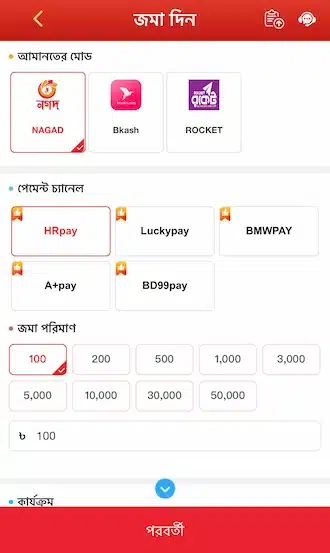
After logging in, click the “Deposit” button on the homepage or menu bar. Select “Nagad” from the list of payment methods.
♥️ Step 3: Enter the Deposit Amount
Enter the amount you want to deposit, such as 500, 1,000, or 5,000 Taka.
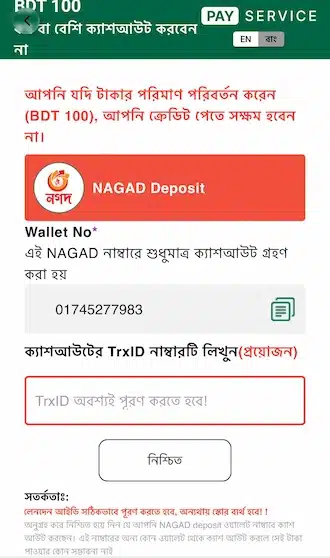
♥️ Step 4: Enter the Transaction Code (TxnID)
The phone number of KX8’s official Nagad agent will appear on the screen. Copy the number. Then open the Nagad app or dial *167# and send the selected amount to that number.
After the transfer is successful, you will receive a TxnID from Nagad. Copy the code. Return to the KX8 page, enter the TxnID in the required field, and click the “Submit” or “Confirm” button.
KX8 Withdrawal Guide for New Players
KX8 offers multiple payment methods for withdrawing money. You can withdraw through a bank account or through Nagad, bKash, and Rocket. The step-by-step instructions are given below.
♥️ Step 1: Log In and Go to the Withdrawal Option
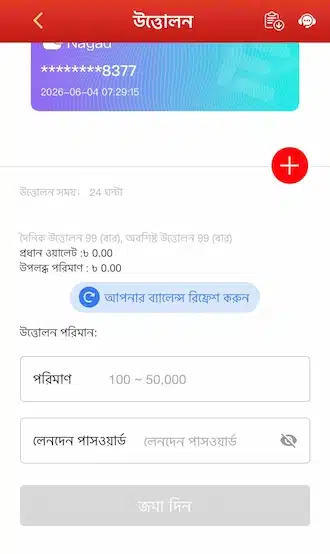
Log in to your KX8 account. Go to the account management section and click the “Withdrawal” option.
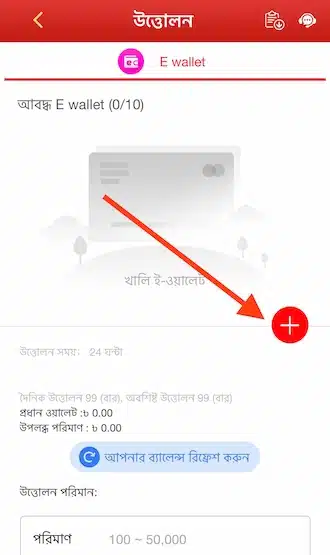
♥️ Step 2: Add a Withdrawal Account
On the withdrawal page, click the red plus (+) icon to add withdrawal account information.
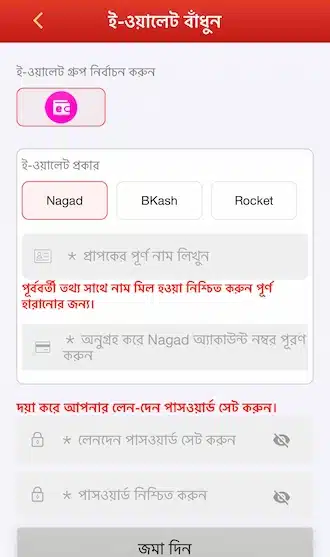
♥️ Step 3: Fill in Account Information
Enter the correct account holder name and account number.
♥️ Step 4: Set a Withdrawal Password
Create a 6-digit withdrawal password. Enter it again to confirm.
♥️ Step 5: Transfer Balance to the Main Wallet
Return to the withdrawal page. Before withdrawing money, transfer the balance to the main wallet.
♥️ Step 6: Enter the Amount and Password
Enter the withdrawal amount. Limit: 100–50,000 Taka. Enter your withdrawal password.
♥️ Step 7: Submit the Request
Click the “Submit” button. The system will process the request, and the money will be updated within 5–10 minutes.
Important Notes Before Deposit and Withdrawal
To keep transactions smooth and avoid unnecessary problems, remember the following points:

💟 Check the Limits
Each payment method on KX8 has different minimum and maximum limits. Check them carefully before making a transaction.
💟 Valid Betting Turnover
You must complete the required betting turnover before withdrawal. If the conditions are not met, the withdrawal request will be rejected.
💟 Enter Correct Information
Enter all information correctly, including bank name, account number, and amount. Incorrect information may cause the transaction to fail.
💟 Read the Promotion Terms
If you receive a first deposit promotion, read the terms carefully, especially the wagering requirements and validity period.
💟 Keep Screenshots
Save a screenshot or receipt for every transaction. If any problem occurs, it can be used as proof.
💟 Contact Support If There Is a Problem
If you face any problem with deposit or withdrawal, contact our 24/7 customer support team.
💟 Follow Fair Play
Fraudulent activity or the use of game hacking software is strictly prohibited. If such activity is found, the withdrawal will be rejected and the account will be suspended.